Drager Apollo / Cicero EM Color / Julian / Primus / Vamos
Note: No additional device configuration required.
| Cable | Adapter | Port | VR Device Name |
|---|---|---|---|
| Direct Serial | None | COM1 | Primus |
Connection Steps
- Connect a direct serial cable to COM1 on the rear.
- Connect the other end to the PC via USB-Serial converter.
If COM1 is already in use, see When the COM1 Port is Already in Use below.
When the COM1 Port is Already in Use
If the Drager COM1 port is already transmitting data to a patient monitor (e.g., CO2 curve, airway pressure), use a Y-cable to read data without disrupting existing communication.
⚠️ When using a Y-cable, enable "Read Only Mode" in Vital Recorder when adding the device.
Y-cable Wiring:
Drager DB9F ─── F/F Cross Gender ─── DB9M ─────────── CON1 (DB9F) ─── M/F Cross Gender
                                        └── CON2 (to PC via USB-Serial converter)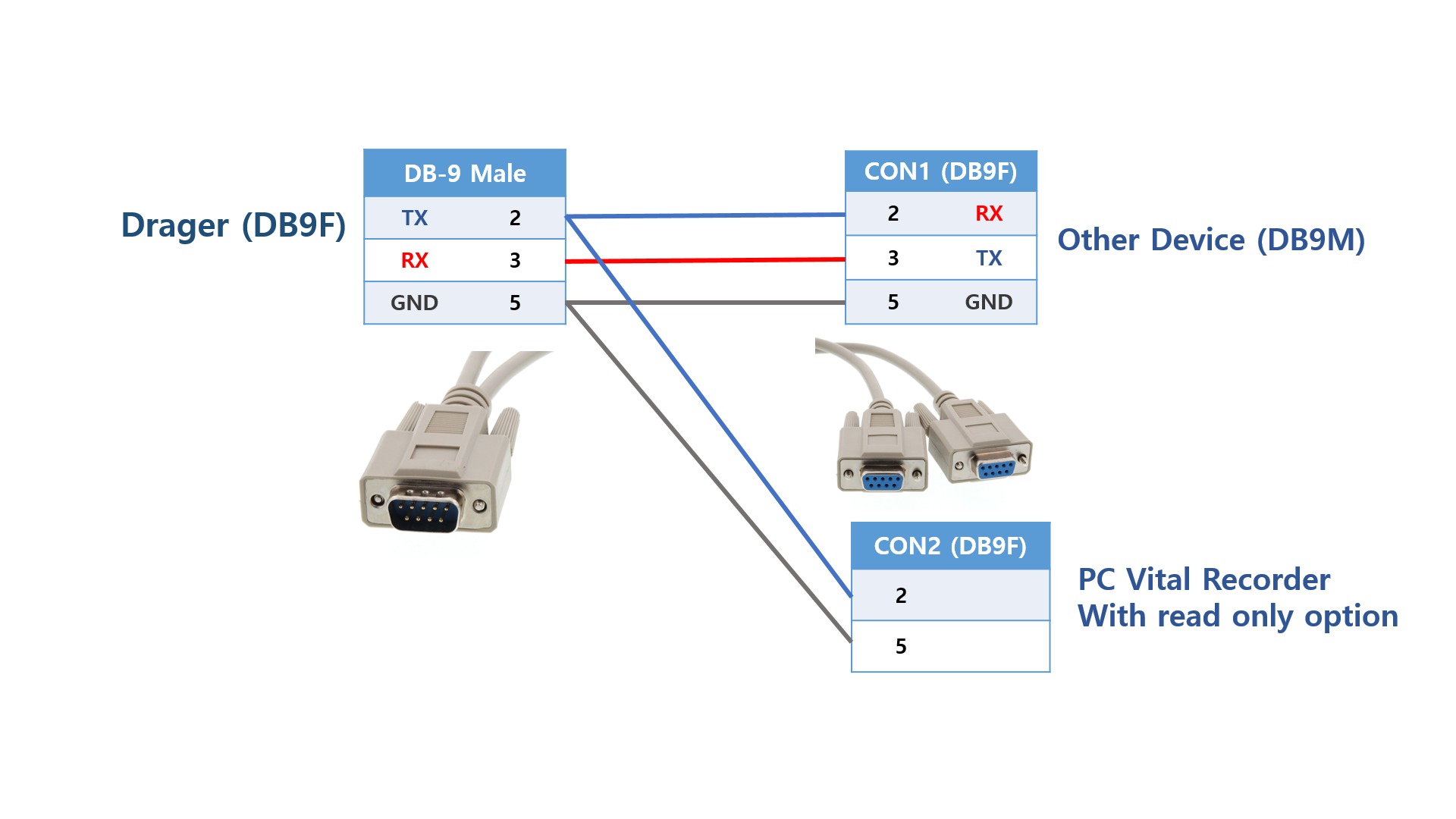
Atlan Anesthesia Machine: Attach a cross-gender adapter on both the anesthesia machine side and the CON1 side. CON2 is used as-is for data reading.