Edwards Lifesciences Vigileo
| Cable | Adapter | Port | VR Device Name |
|---|---|---|---|
| Direct serial cable | Null modem adapter (M/F) | RS-232 serial port | Vigileo |
Connection Steps
- Connect a direct serial cable to the rear serial port using a null modem adapter (M/F).
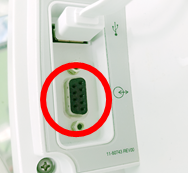
Device Configuration
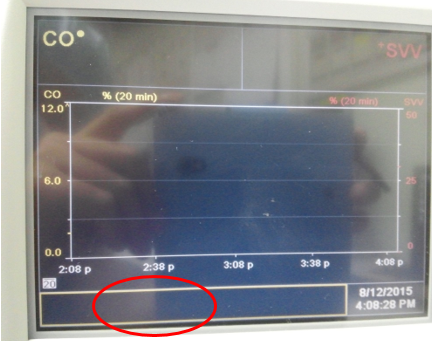
- Tap the blank strip at the bottom left of the monitoring screen — there is no labeled button — to open the Status Menu.
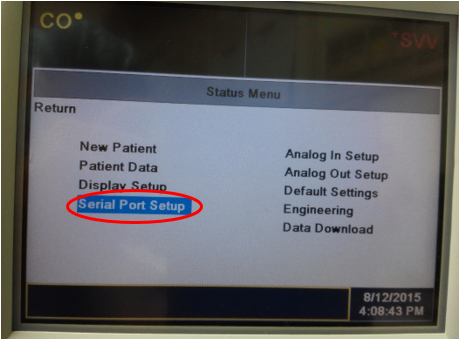
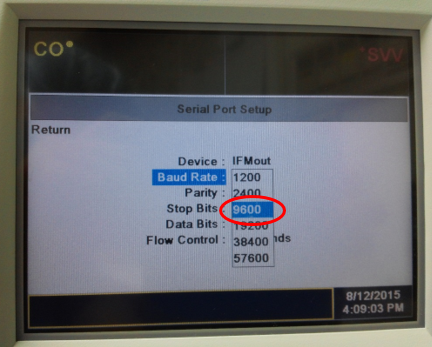
- In the Status Menu select Serial Port Setup.
- Set Device to IFMout.
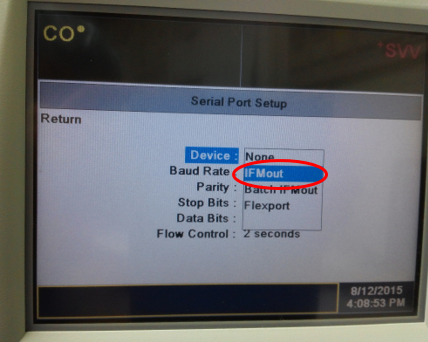
- Set Baud Rate to 9600, leave the other serial settings at their defaults, and press Return.
Vital Recorder Setup
Add the device as Vigileo and select the PC serial port used for the connection.