Blink Device TwitchView
Note: Data leaves the system only through the RJ45 connector on the Charging Station, and only while the Monitor is docked.
| Cable | Adapter | Port | VR Device Name |
|---|---|---|---|
| Custom RJ-45 to DB-9F serial cable | None | RJ45 on the Charging Station | TwitchView |
Connection Requirements
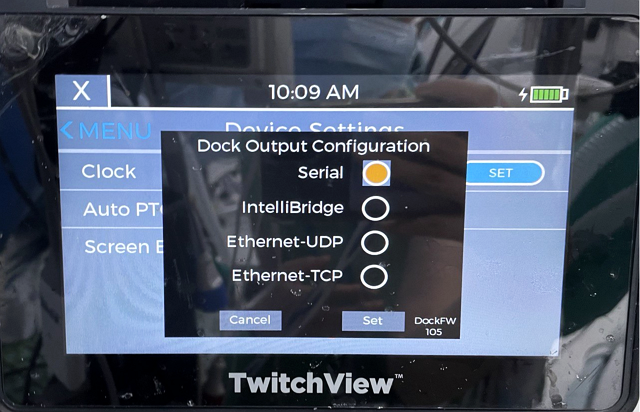
The Charging Station carries a combined RS-232 serial + Ethernet port on a single industry-standard RJ45 connector. Selecting which of the two is active is done on the Monitor (see Device Configuration).
Cable Pinout
Only three conductors are used:
| DB-9 Female (PC side) | RJ45 (Charging Station side) | |
|---|---|---|
| 2 — RX | ← | 4 — TX |
| 3 — TX | → | 5 — RX |
| 5 — GND | ↔ | 7 — GND |
Connection Steps
- Dock the Monitor in the Charging Station.
- Build the custom cable as shown in Cable Pinout.
- Plug the RJ45 end into the Charging Station and the DB-9F end into a USB-Serial converter, then into the PC.
Device Configuration
- In Dock Output Configuration, select Serial, then press Set.
Vital Recorder Setup
- Add the device in Vital Recorder as
TwitchView.