GE CARESCAPE B850 / B650 / B450
Note: Protocol: GE S5 Computer Interface (also used by GE B40/B20, S/5 monitors).
| Cable | Adapter | Port | VR Device Name |
|---|---|---|---|
| ATEN UC-232A USB-to-RS232 | Null Modem F/F | USB port | Bx50 |
⚠️ ATEN UC-232A is the only compatible USB-to-serial converter for CARESCAPE B850/B650/B450. Other USB-to-serial converters (including Startech ICUSB232V2) will not work. Do not connect to the monitor's serial port — use the USB port only.
Connection Steps
- Connect the ATEN UC-232A USB-to-RS232 converter to any USB port on the rear of the monitor.
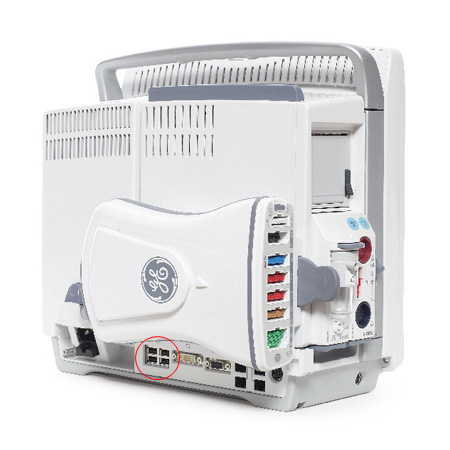
- Attach a Null Modem (F/F) adapter to the RS-232 end of the converter.
- Connect a direct serial cable from the adapter to the PC (or USB-Serial converter on the PC side).
VRZero note: The USB cable connecting to VRZero must support handshaking. Compatible cables: