GE Dash 2500
Note: Protocol: GE Dinamap Protocol.
| Cable | Adapter | Port | VR Device Name |
|---|---|---|---|
| Direct Serial | None | Host Comm Port | Dash2500 |
Connection Steps
- Connect a direct serial cable to "Host Comm Port" on the rear.
- Connect the other end to the PC via USB-Serial converter.
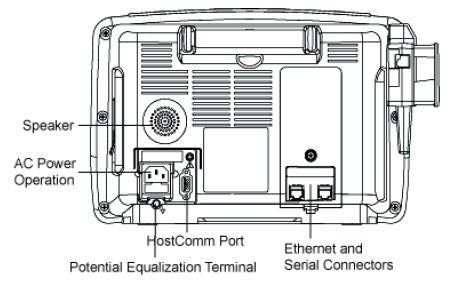
Device Configuration (only if communication is not established):
- Turn the Trim Knob → Main Menu.
- Select Other System Setting → Go to Config Mode → Yes. Device reboots.
- Enter code
2508→ Done. - Select Configuration Menu → Other System Settings → Config HostComm.
- Select Remote Access → Serial 2.
- Select Serial 2 Setup → ASCII cmd → 9600 baud (default).
- Select Go to Previous Menu → Save Default Changes.
- Select Exit Configuration Mode → Yes. Device reboots.