GE Solar 8000m / 8000i
Note: This RS-232 connection supports numeric data only. To record waveforms, use the ANALOG OUT port on a TRAM-RAC 4A with an analog-to-digital converter (ADC).
| Cable | Adapter | Port | VR Device Name |
|---|---|---|---|
| direct serial cable | None | RS-232 1 | Solar8000 |
Connection Steps
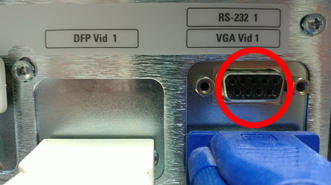
- Connect the direct serial cable to the port labeled RS-232 1.
Device Configuration
No changes to the monitor settings are required.
Vital Recorder Setup
- Add the device as
Solar8000and select the PC serial port used for the connection.