Fresenius Kabi Agilia
Note: Use the proprietary Fresenius Kabi cable.
| Cable | Adapter | Port | VR Device Name |
|---|---|---|---|
| Proprietary Fresenius Kabi cable (7-pin mini-DIN pump side, DB-9F output) | None | Serial port (7-pin mini-DIN) | Agilia |
Connection Requirements
Fresenius Kabi Agilia requires its own cable that can be purchased by contacting Fresenius Kabi.
Connection Steps
- Open the rubber cap covering the pump’s circular connector. Align the plug with the keyway and insert it, then turn the locking collar by hand until the plug is securely fastened.
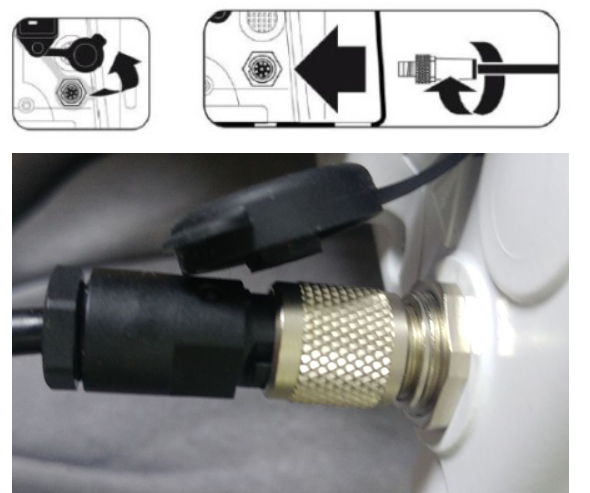
- Connect the USB-Serial converter to the PC.
Device Configuration
No pump-side configuration is required; connect the proprietary cable as described above.
Vital Recorder Setup
- Add the device in Vital Recorder as
Agilia.