Problem: COM port not shown after device connection
Device Driver Not Installed
| Cause | Device driver not properly installed. |
| Diagnosis | Open Device Manager. A yellow exclamation mark on the USB Serial Port device indicates a driver problem. Normal display shows the device under "Ports (COM & LPT)". |
| Solution | Download and install the driver for your Serial-to-USB converter from the manufacturer's website. If the problem persists, replace the converter. |
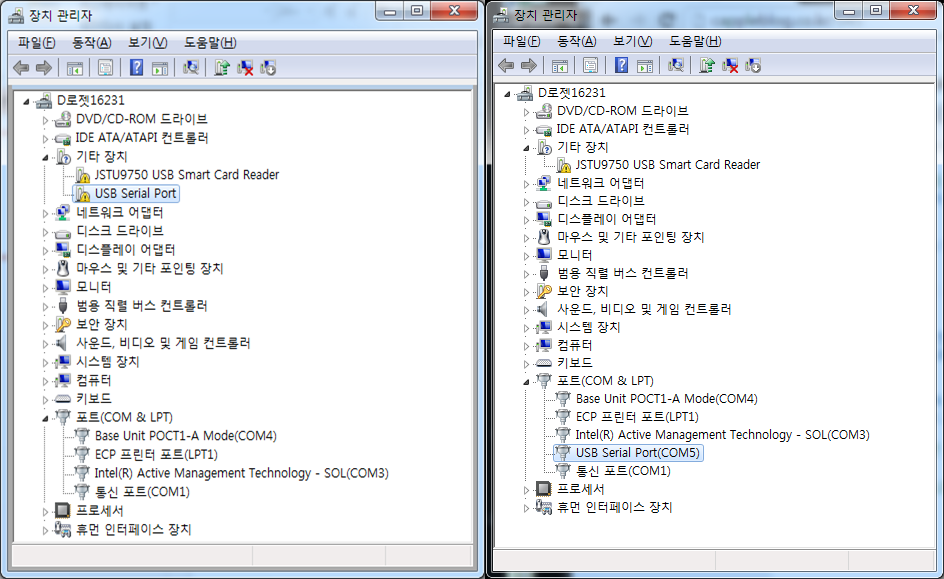
Connected to Wrong Port
| Cause | With a 4-port USB hub, physical port order and assigned COM port numbers may not match. |
| Solution | Connect one device at a time and try different COM port numbers in the Add Device dialog. |
Problem: Data drops out intermittently after initial connection
USB Hub Power Shortage (Most Common)
| Cause | Insufficient power from USB port. Common when multiple devices share a hub without external power. |
| Solution | Use a powered USB hub with its own external power adapter. |
⚠️ This is the most common cause of intermittent data loss. Always use a powered USB hub when connecting multiple devices.
External Electrical Noise
| Cause | OR equipment (electrocautery, cardiopulmonary circulator, air warmer, neuromuscular monitors) generates electrical noise. |
| Diagnosis | Data loss correlates with use of external equipment, especially electrosurgical units. |
| Solution | Use a separate power supply for the data acquisition PC. Keep electrocautery power cables away from the data PC and USB hub. Use short, shielded, or twisted cables. |
Poor USB Port Connection (2nd Most Common)
| Cause | Damaged or worn USB port from cables being pulled. Common in OR environments. |
| Solution | Secure all cables with cable ties. If a port is damaged, use a different port or a powered USB hub. |
Defective USB Cable
| Cause | Internal cable breakage from stepping on, twisting, or pulling. |
| Solution | Replace the USB cable. |
USB Extension Cable Issues
| Cause | Poor contact or signal degradation over excessive cable length. |
| Solution | Remove the extension cable and connect the USB device directly to the PC. |