Dräger Fabius
Note: Check the machine's manufacture date before ordering a cable. The Fabius shipped with two different COM1 connectors, and the adapter you need depends on which one is fitted. Read Connection Requirements first.
| Cable | Adapter | Port | Serial | VR Device Name |
|---|---|---|---|---|
| direct serial cable (female COM1, manufactured Oct 2004 onward) | None | COM1 | 9600, 8 / Even / 1 — MEDIBUS | Fabius |
| direct serial cable (male COM1, manufactured before Oct 2004) | Null Modem adapter (F/F) | COM1 | 9600, 8 / Even / 1 — MEDIBUS | Fabius |
Connection Requirements
The Fabius COM1 connector changed in October 2004, and the two versions assign the transmit and receive pins differently:
| Manufactured | COM1 connector | What to fit |
|---|---|---|
| Before Oct 2004 | Male (pins) | Null Modem adapter (F/F) at COM1, then a direct serial cable |
| Oct 2004 onward | Female (sockets) | direct serial cable only — no adapter |
Identify the connector by looking at COM1 on the machine, not by the model name: the same model was sold across the change. The gender rule is the same one used throughout this guide — an adapter fitted to a male device port must be F/F, one fitted to a female device port must be M/F.
Connection Steps
- Look at COM1 on the machine and note whether it is male or female.
- Fit the adapter, if the connector calls for one:
- Female COM1 — nothing to fit. Connect a direct serial cable straight from COM1.
- Male COM1 — attach a Null Modem adapter (F/F) at COM1, then the direct serial cable.
Device Configuration
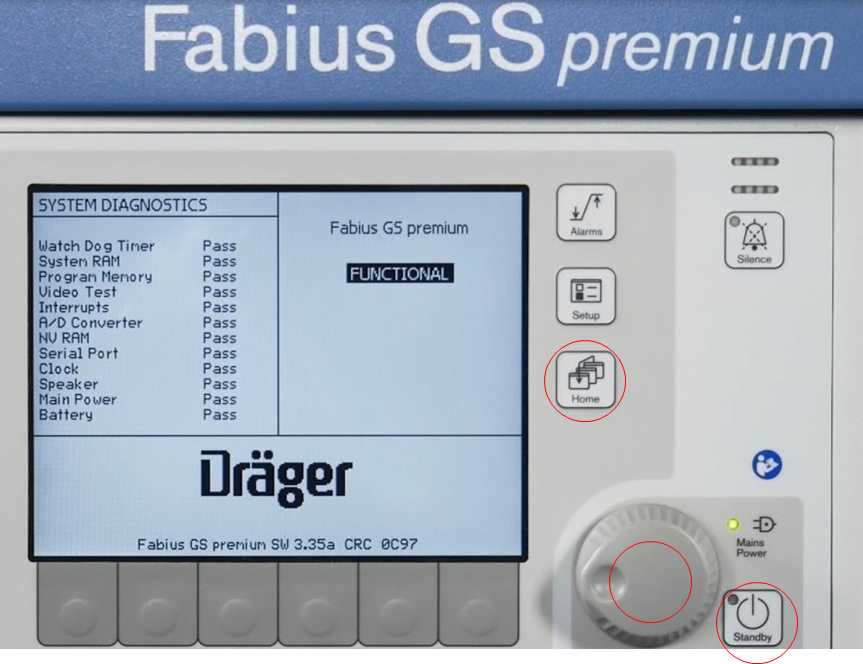
- Press the three controls circled in red at the same time — the Home key, the rotary knob, and the Standby key — to enter service mode. The system diagnostics screen is shown while the machine starts into that mode.
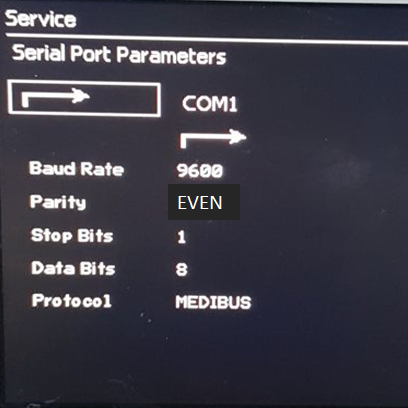
- Open Service → Serial Port Parameters, select COM1, and set:
| Parameter | Value |
|---|---|
| Protocol | MEDIBUS |
| Baud Rate | 9600 |
| Data Bits | 8 |
| Parity | Even |
| Stop Bits | 1 |
Vital Recorder Setup
Add the device as Fabius and select the PC serial port used for the connection.