Edwards Lifesciences Vigilance II
| Cable | Adapter | Port | VR Device Name |
|---|---|---|---|
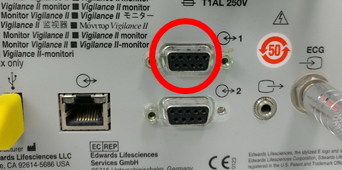
| Direct serial cable | Null modem adapter (M/F) | Rear serial port 1 (upper DB-9) | Vigilance |
Connection Steps
- Connect a direct serial cable to serial port 1 using a null modem adapter (M/F).
Device Configuration
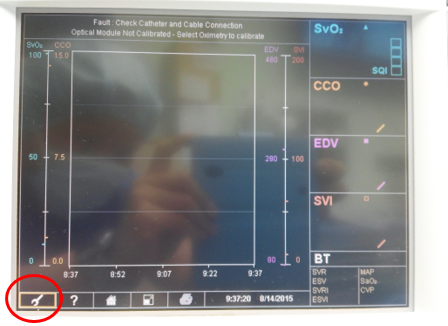
- Select the Setup icon (wrench).
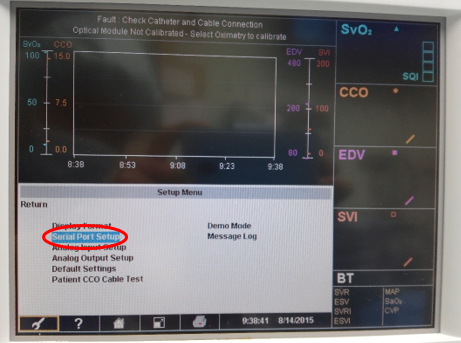
- In the Setup Menu select Serial Port Setup.
- In the Com 1 column, apply the settings below and press Return.
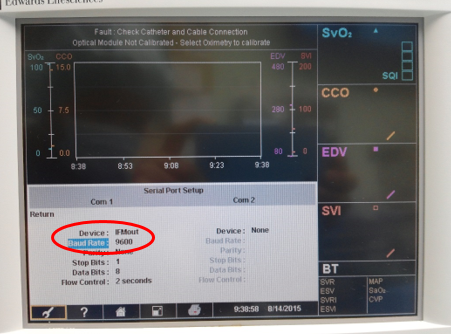
Resulting serial settings:
| Parameter | Value |
|---|---|
| Device | IFMout |
| Baud Rate | 9600 |
| Parity | None |
| Stop Bits | 1 |
| Data Bits | 8 |
| Flow Control | 2 seconds |
Vital Recorder Setup
Add the device as Vigilance and select the PC serial port used for the connection.