Sentec SDM
Note: The serial interface is disabled while trend data are being downloaded over the LAN port. It is reactivated automatically once the LAN download finishes.
| Cable | Adapter | Port | VR Device Name |
|---|
| Direct serial cable | None | RS-232 port | SDM |
Cable Pinout
| DB-9 Pin | Signal |
|---|
| 2 | TxD (from SDM) |
| 3 | RxD (to SDM) |
| 5 | Signal ground |
| 1, 4, 6–9 | Reserved |
Connection Steps
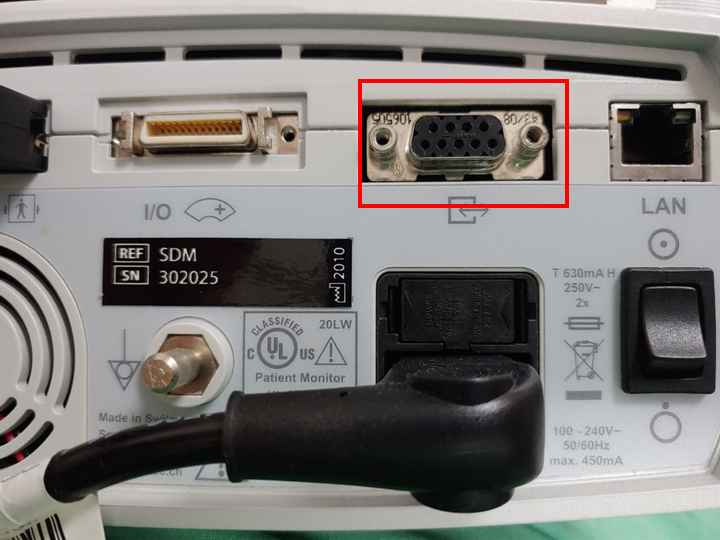
- Connect a direct serial cable to the Serial Data Port (RS-232) on the rear of the SDM.
- Connect the other end to the PC through a USB-Serial converter.
- If using a USB-Serial converter, connect its USB end to the PC.
Device Configuration
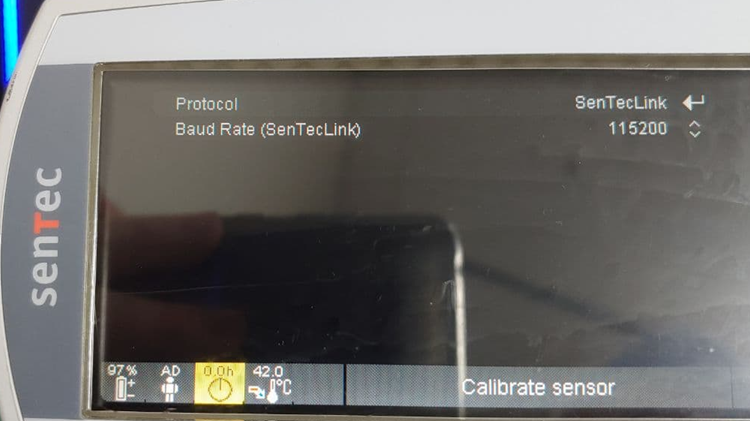
Open Interfaces → Serial Interface and apply the settings below for this Vital Recorder connection.
| Parameter | Value |
|---|
| Protocol | SenTecLink |
| Baud Rate | 115200 |
Vital Recorder Setup
- Add the device in Vital Recorder as
SDM.