Nihon Kohden BSM
Note: The availability of RS-232C and ECG/BP OUT ports depends on the monitor model and installed interface or input unit. If the required port is not present, contact Nihon Kohden to confirm the compatible hardware and installation options. RS-232C supports numeric data only. ECG and invasive blood pressure waveforms require an ECG/BP OUT connection and an analog-to-digital converter (ADC).
| Connection | Cable or Interface | Adapter | Device Port | Vital Recorder Device Type |
|---|---|---|---|---|
| Numeric data — QI-373P | Direct serial cable (DB-9 M/F) | Null modem (M/F) | RS-232C on the QI-373P interface | BSM |
| Numeric data — other interfaces | Cable appropriate for the interface | Confirm for the interface | RS-232C | BSM |
| ECG/BP waveforms | Compatible Nihon Kohden ECG/BP output cable, connection cable for the ADC, and ADC | Depends on the ADC connection | ECG/BP OUT | Select the device type for your ADC |
Connection Requirements
Numeric Data
| Model | RS-232C Interface |
|---|---|
| BSM-1700 series | Built-in; no additional interface board required |
| BSM-3000 series | QI-373P, subject to model compatibility |
| BSM-6301 | QI-631P |
| BSM-6501 / BSM-6701 | QI-671P |
The direct serial cable + null modem adapter (M/F) configuration applies to QI-373P. Confirm the cable and adapter requirements for other interfaces.
ECG/BP Waveforms
| Model | ECG/BP OUT |
|---|---|
| BSM-1700 series | Built into the monitor; no additional interface board required |
| BSM-3000 series | Provided by a compatible QI-371P or QI-372P interface |
| BSM-6000 series | Provided by a compatible AY input unit; not available on AY-660P |
An RS-232C interface does not necessarily provide ECG/BP OUT.
Use a compatible YJ-910P or YJ-920P ECG/BP output cable and an ADC. The connection between the output cable and the ADC depends on the cable termination and the ADC's input connector.
Connection Steps
Numeric Data
- Identify the RS-232C socket (DB-9 female, marked with the serial
IOIOIicon) on the interface unit's panel. Do not confuse it with the 15-pin RGB/video socket (IOI) directly below it, or with the RJ-45 network socket.
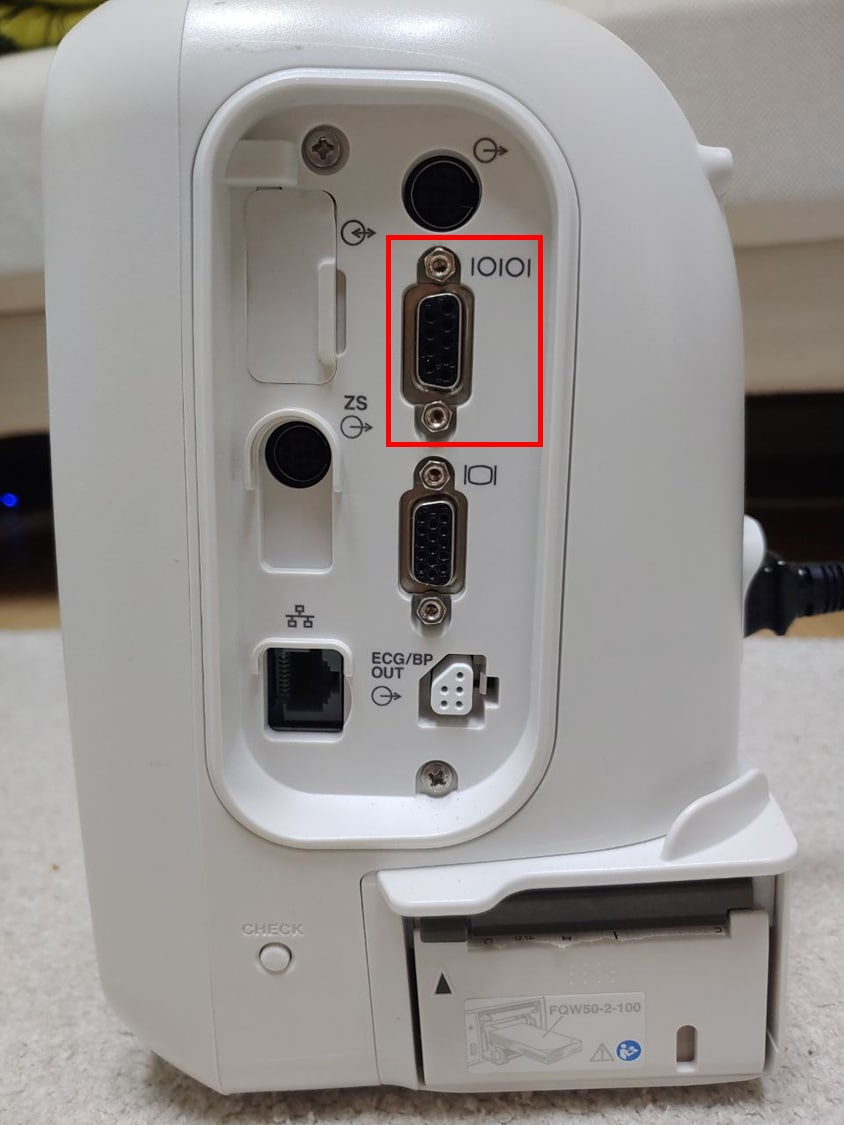
- Attach a Null Modem adapter (M/F) to that socket. Secure the adapter with the connector screws.
- Connect a direct serial cable from the adapter to the PC's DB-9M port or a USB-Serial converter.
ECG and Arterial Pressure Waveforms
ECG and arterial pressure waveforms come out of the ECG/BP OUT port as analog voltages, visible on the same connector panel as the serial socket.
- Plug the Nihon Kohden ECG/BP output cable into the
ECG/BP OUTport. - Build a 5.5pi Mono ↔ RJ45 cable to bring the analog outputs into the ADC (SNU-ADC / SNUADCM, DataQ DI-149/DI-155, …).
- Connect the ADC to the PC via USB.
Network Collection Through a Central Station
Where a Nihon Kohden central station with the HL7 gateway is installed, Vital Recorder can collect data over the network without a per-bed serial cable. Add these three devices:
| Vital Recorder device | Data | Port |
|---|---|---|
NIHONKOHDEN::ADT | Patient ID | 9007 |
NIHONKOHDEN::ORF | Numeric data every 30 seconds | 7999 |
NIHONKOHDEN::NealTime | Waveforms, up to three — default ECG_II, PLETH and AWP | 9001 |
Network collection may be available through a compatible Nihon Kohden central monitoring system and HL7 gateway. Confirm the available data and connection settings with Nihon Kohden and the hospital's system administrator.
Device Configuration
No changes to the monitor settings are required.
Vital Recorder Setup
- Add the device as
BSMand select the PC serial port used for the connection.