Introduction
Vital files can be downloaded from My Files, VitalSync or Download API. From My Files, you can retrieve a file list by bed name/date/tracks and preview file contents. Using VitalSync or Download API, you can download a large number of files at once.
My Files
On My files page, you can search, view, and download vital files recorded by PiVR or WinVR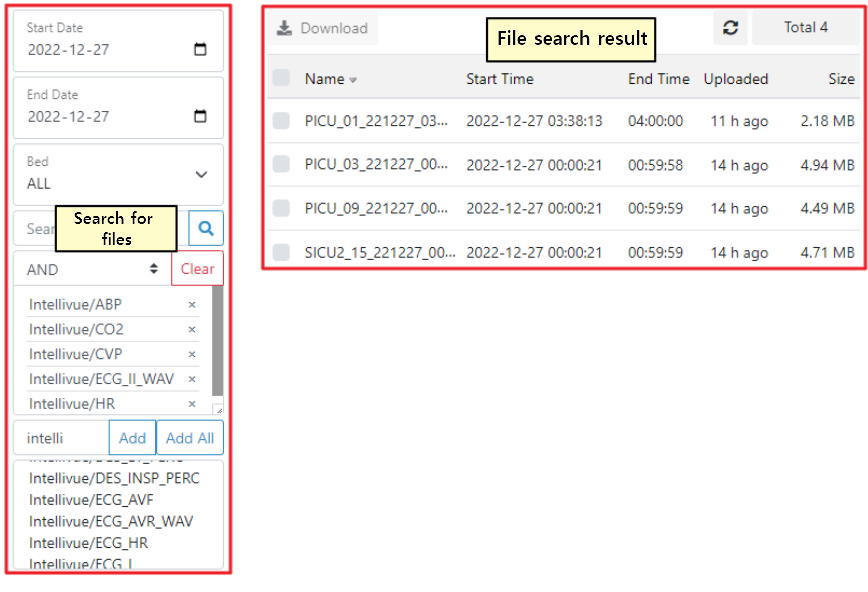
Search Files
On this page, you can search for files under various conditions as shown in the figure above and download retrieved files.
- Start Date, End Date: search files based on the date the file was recorded
- Bed: file search by bed name/operating room
- Search Keyword: search by filename.
- Tracks: list files by device/parameter name
File List
- Filename, recording start time/end time, file uploaded time, and size are shown in the list.
- The list of files in the center of the above image is the result of searched files recorded on 2022-12-27, where ABP, CO2, CVP, ECGIIWAV, and HR tracks were acquired from the Intellivue device.
File View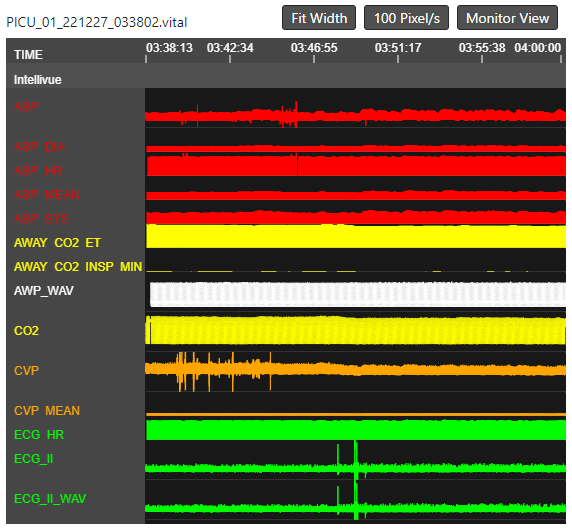
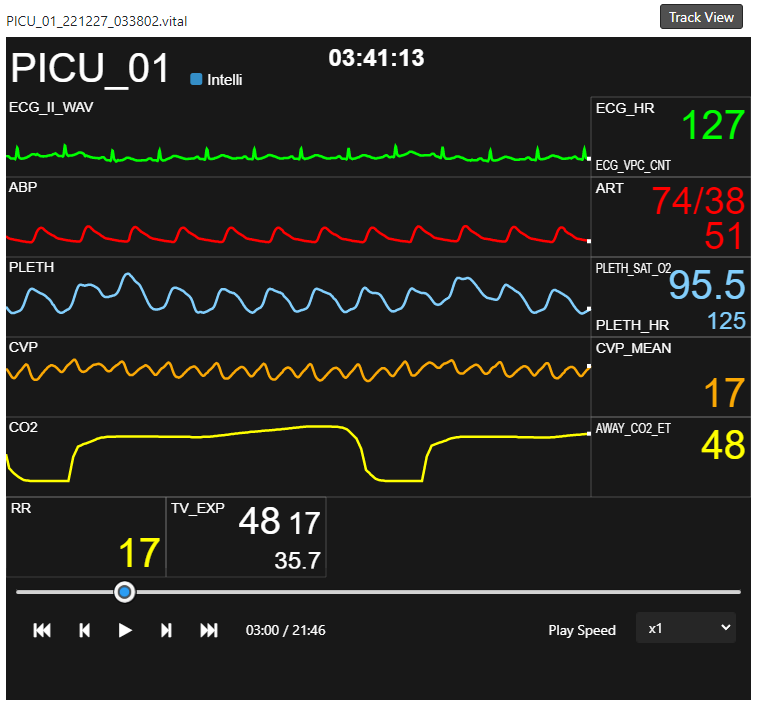
- When you click a file name in the list, you'll see a preview of the file on the right side of the My Files page.
- You can check the overall history without downloading the file.
- How to operate Track View (left picture)
- Mouse Scroll1: scroll over the track name to scroll track list up/down.
- Mouse Scroll2: zoom in/out the view by scrolling over the point you want to take a look.
- Mouse drag: Drag the mouse left/right to move the time bar.
- Monitor View (right picture)
- Click the Monitor View button on the top right of the track view to switch to the monitor view mode.
- The operation is the same as the monitor on the Web Monitoring page.
VitalSync
VitalSync is an application, included in VitalRecorder for Windows, that assists file batch download. It is available on Windows only.
- Install VitalRecorder for Windows from vitaldb.net and run VitalSync, which looks like the image below.

- If you are downloading files from Vitalserver (On-premise), please delete vitaldb.net from the first input and enter the IP address of the server.
- Enter your ID and password and click Login. It might take a while to render a file list depending on the number of files stored in the server. The result looks like the image below.
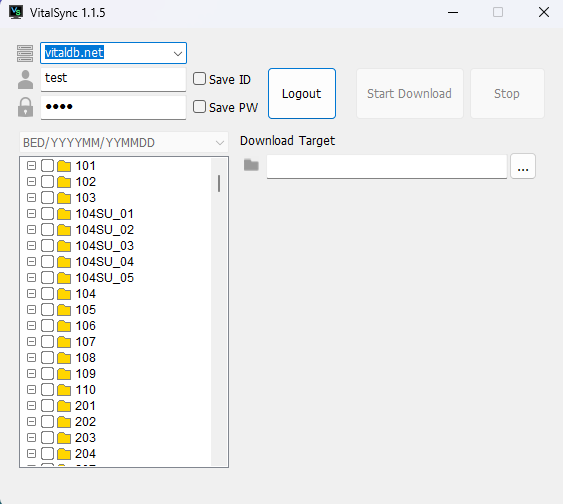
- Select the checkbox of the file to download.
- Set Download Target and click Start Download button.
API
Bulk file download can be done using Filelist and Download API. Please refer to VitalDB Web API or Intranet VitalDB API document. The following is the sample code to download files in bulk.

Please use “pip install vitaldb” before running our sample code.
import vitaldb
import os
import datetime
DOWNLOAD_DIR = "path/to/folder"
if not os.path.exists(DOWNLOAD_DIR):
os.mkdir(DOWNLOAD_DIR)
if vitaldb.login('ID', 'PASSWORD', 'SERVERIP', 'SERVERPORT'):
for f in vitaldb.filelist(bedname="D1", dtstart="2010-10-01", dtend="2010-10-02")
opath = DOWNLOAD_DIR + "/" + f['filename']
if os.path.exists(opath):
continue
vitaldb.download(f['filename'], opath)
Sample code below reads filenames from an Excel file and downloads them to a local PC.
import vitaldb
import os
import pandas as pd
DOWNLOAD_DIR = 'path/to/folder'
if not os.path.exists(DOWNLOAD_DIR):
os.mkdir(DOWNLOAD_DIR)
df = pd.read_excel('list.xlsx')
if vitaldb.login('ID', 'PASSWORD', 'SERVERIP', 'SERVERPORT'):
for idx, row in df.iterrows():
filename = row['filename']
opath = DOWNLOAD_DIR + '/' + filename
if os.path.exists(opath):
continue
vitaldb.download(filename, DOWNLOAD_DIR)