Find your device in the tables below, then open its guide for cable wiring, device settings, and Vital Recorder setup.
Disclaimer: This guide is for reference. Our team is not responsible for connection errors. Follow the manufacturer's instructions for equipment operation and electrical safety. If this guide conflicts with the manufacturer's manual, follow the manual.
Use the latest Vital Recorder release. See the device-related version notes or the official version history.
Contents
- Device Quick Reference
- Patient Monitors
- Anesthesia Machines
- Mechanical Ventilators
- Hemodynamic Monitors
- Infusion Devices
- Brain Monitors
- Multifunction monitors
- Neuromuscular monitors
- Getting Started
Device Quick Reference
These tables summarize the connection requirements for each device. Follow the linked device guide for connection and setup instructions.
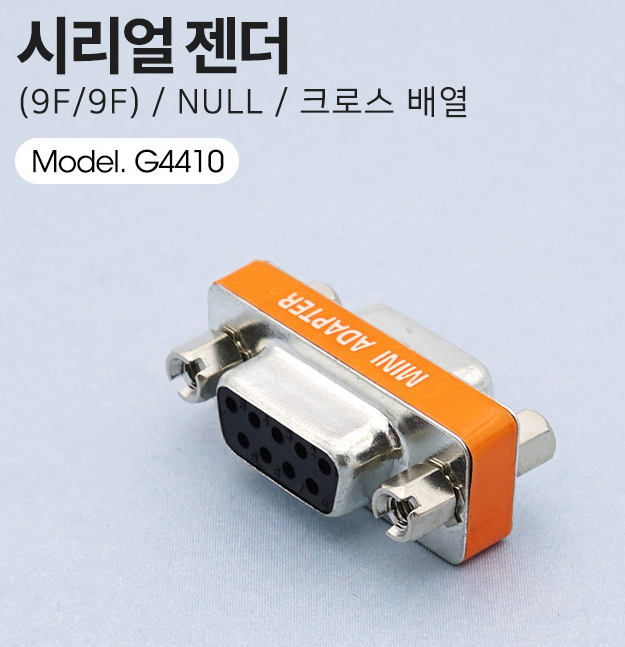
Null modem adapters use crossover wiring. M/F and F/F indicate connector gender.
Patient Monitors
| Device | Cable or Interface | Adapter | Device Port | Vital Recorder Device Type |
|---|---|---|---|---|
| GE CARESCAPE B850 / B650 / B450 | Monitor-side USB-Serial converter (compatible with the monitor’s software version) | Null modem (F/F) | USB port | Bx50 |
| GE S/5 AM | Direct serial cable | Null modem (F/F) | Port X8 | Bx50 |
| GE B40 / B20 | 9-pin serial cable with pin 4 removed | GE Multi I/O adapter (if not already installed) | 9-pin RS-232 port on the Multi I/O adapter | Bx50 |
| GE B105M / B125M / B155M | Direct serial cable | None | X5 Serial port | B1x5M |
| GE Solar 8000m / 8000i | Direct serial cable | None | RS-232 1 | Solar8000 |
| GE Dash 2000 / 3000 / 4000 / 5000 | Custom RJ-45 to DB-9F cable | None | RJ-45 AUX | Dashx000 |
| GE Dash 2500 | Direct serial cable | None | HostComm port | Dash2500 |
| GE TRAM-RAC 4A | ADC required (analog) | None | 15-pin ANALOG OUT | Select the ADC device type |
| GE Defib Connectors | 7-pin DIN to ADC | None | Defib.Sync | Select the ADC device type |
| Philips IntelliVue MP / MX | Custom RJ-45 to DB-9F cable | None | MIB/RS232 port | Intellivue |
| Dräger Infinity Kappa | 14-pin Mini-D to DB-9F cable (Dräger export protocol cable #5206441) | None | X5 port | Infinity |
| Dräger Infinity C500 / C700 | Custom RJ-10 to DB-9F cable | None | RJ-10 port on P2500 | Infinity |
| MEKICS MP1300 | Wi-Fi via an external router | — | LAN port | MEKICS |
| Nihon Kohden BSM — numeric data | Direct serial cable | Null modem (M/F) | RS-232C on a model-specific interface; contact Nihon Kohden for interface requirements. | BSM |
| Nihon Kohden BSM — ECG/BP waveforms | ECG/BP output cable + custom cable to ADC + ADC | — | ECG/BP OUT; check interface requirements for your model | Select the device type for your ADC |
| Nihon Kohden PVM-4700 | Direct serial cable | Null modem (M/F) | RS-232C on a model-specific interface; contact Nihon Kohden for interface requirements. | PVM |
| GE Corometrics 170 Series | Custom RJ-45 to DB-9F cable | None | RS-232 Port 1 or 2 | Coro |
| GE Corometrics 250cx | Custom RJ-11 to DB-9F cable | None | RJ-11 serial port | Coro |
Anesthesia Machines
| Device | Cable or Interface | Adapter | Device Port | Vital Recorder Device Type |
|---|---|---|---|---|
| Dräger Apollo / Cicero EM Color / Julian / Vamos | Direct serial cable | None | COM1 | Medibus |
| Dräger Primus | Direct serial cable | None | COM1 | Primus |
| Dräger Fabius GS | Direct serial cable | Check the COM1 connector: Male (before Oct 2004): Null modem (F/F) Female (Oct 2004 onward): None | COM1 | Fabius |
| Dräger Zeus | Direct serial cable | Null modem; connector gender not confirmed | Rear COM port | Medibus |
| Dräger Perseus A500 | Direct serial cable | Null modem (F/F) | COM1 or COM2 | MedibusX |
| Dräger Atlan | Direct serial cable | Null modem (F/F) | COM1 or COM2 | MedibusX |
| GE Datex-Ohmeda | Custom 15-pin D-sub (M) to DB-9F serial cable | None | 15-pin (under cover) | Datex-Ohmeda |
| Maquet Flow-i | Direct serial cable | Null modem (M/F) | Serial port | Flow-i |
Mechanical Ventilators
| Device | Cable or Interface | Adapter | Device Port | Vital Recorder Device Type |
|---|---|---|---|---|
| Dräger EVITA V300 / V500 / V600 / V800 | Direct serial cable | Null modem; connector gender not confirmed | RS-232 COM1 | MedibusX |
| Maquet / Getinge Servo-i / Servo-s | Direct serial cable | Null modem (M/F) | Bottom RS-232 port | Servo-i |
| Maquet / Getinge Servo-U | Direct serial cable | Null modem; connector gender not confirmed | RS-232 port | Servo-u |
| Hamilton G5 | Direct serial cable | Null modem (M/F) | Monitoring Interface 1 or 2 | Hamilton |
Hemodynamic Monitors
| Device | Cable or Interface | Adapter | Device Port | Vital Recorder Device Type |
|---|---|---|---|---|
| Edwards EV-1000 | Direct serial cable | Null modem (F/F) | Second serial port from the right | EV1000 |
| Edwards EV-1000A | Direct serial cable | Null modem (M/F) | Serial port | EV1000 |
| Edwards Vigilance | Direct serial cable | Null modem (M/F) | COM1 (or COM2) | Vigilance |
| Edwards Vigilance II | Direct serial cable | Null modem (M/F) | Port 1 (top) | Vigilance |
| Edwards Vigileo | Direct serial cable | Null modem (M/F) | Serial port | Vigileo |
| Edwards HemoSphere | Direct serial cable | Null modem (M/F) | Serial port | Hemosphere |
| Deltex CardioQ | Direct serial cable | Null modem (F/F) | Male serial port | CardioQ |
| LiDCO | Direct serial cable | Null modem (M/F) | COM1 | LiDCO |
Infusion Devices
| Device | Cable or Interface | Adapter | Device Port | Vital Recorder Device Type |
|---|---|---|---|---|
| Fresenius Vial Orchestra | Direct serial cable | Null modem (M/F) | RS232-3 | Orchestra |
| Fresenius Kabi Agilia | Proprietary Fresenius cable | None | Device-specific | Agilia |
| Fresenius Kabi Link+ Agilia | USB-A ↔ USB mini-B (5-pin) | None | USB mini-B | Link+ |
| B. Braun SpaceCom | Cable for 9-pin mini-DIN | None | Mini-DIN | SpaceCom |
| Bionet Pion TCI | Direct serial cable | None | 9-pin port | Pion |
| Belmont FMS (RI-2) | Direct serial cable | Null modem (F/F) | Serial port (behind vent panel) | FMS |
Brain Monitors
| Device | Cable or Interface | Adapter | Device Port | Vital Recorder Device Type |
|---|---|---|---|---|
| Medtronic BIS VISTA | Direct serial cable | None | RS-232 port | VISTA (ASCII) / BIS (binary) (Legacy Binary) |
| Medtronic BIS A-2000 | Direct serial cable | None | RS-232 port | A2000 |
| Medtronic INVOS Cerebral/Somatic Oximetry | Direct serial cable | Null modem (F/F) | RS-232 port | Invos |
| OBELAB NIRSIT-ON+ | Direct serial cable | None | USB port | NirsitON |
Multifunction monitors
| Device | Cable or Interface | Adapter | Device Port | Vital Recorder Device Type |
|---|---|---|---|---|
| Masimo Radical-7 | Direct serial cable | None | P1 RS-232 (docking station) | Radical7 |
| Masimo ROOT | Masimo data-acquisition USB cable | None | USB1 or USB2 | Root |
| Sentec SDM | Direct serial cable | None | RS-232 port | SDM |
| Mdoloris ANI Monitor V2 | Direct serial cable | None | REAL TIME EXPORT | ANIMonitor2 |
Neuromuscular monitors
| Device | Cable or Interface | Adapter | Device Port | Vital Recorder Device Type |
|---|---|---|---|---|
| Blink Device TwitchView | Custom RJ-45 to DB-9F serial cable | None | RJ-45 on the charging station (monitor docked) | TwitchView |
| IDMED TOFscan | TOF-RS1 Optic-Serial (RS232) cable | None | Optical output | TOFScan |
Getting Started
Requirements
Computer
Vital Recorder runs on Windows, Raspberry Pi, and Ubuntu. See the Vital Recorder User Manual for platform-specific setup instructions.
Serial Cables
Direct cables connect corresponding pins at both ends. Cross cables cross the transmit and receive lines. The cable type cannot be reliably identified by appearance alone.
For standard DB-9 connections, use a direct cable and add a null modem adapter when specified in the device guide. Follow that guide for any custom or manufacturer-specific cable requirements.
M/F and F/F indicate connector gender (M = male; F = female). A null modem adapter provides crossed pin connections; a straight-through gender changer does not.
Null Modem Adapters
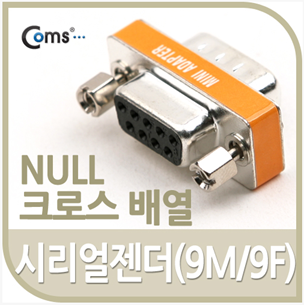
M/F — male at one end, female at the other
F/F — female at both ends